Best CRM for small business in 2026
Best CRM for small business in 2026: nine tools with prices read on 26 October 2026, free plans, costs for 3, 10 and 25 users and who should skip each.

 Ruslan NazarovHead of SAASLEDGE
Jump to
- Best CRM for small business in numbers
- The nine CRMs side by side
- How the order was set
- What a CRM for a small business has to do
- The best CRM for small business, one by one
- What a CRM costs for 3, 10 and 25 users
- Free CRM for small business: what free allows
- Limits that decide fit
- Choosing by situation
- CRM with accounting, ERP or support
- How to move in without losing a month
- What to check in a trial
- Questions people ask about the best CRM for small business
The best CRM for small business is the one your whole team will open every morning, and whose price at next year’s headcount still looks sensible. Nine are compared below, with prices read on the vendors’ own pages on 26 October 2026.
Three of the nine have a permanent free plan, and one has a single price with no tiers. The rest differ mostly in what they charge for the second and third feature you need.
Best CRM for small business in numbers
Eight figures say more than a ranking would. Each one names the vendor and the day it was read.
- $15 per user per month is the one price of Less Annoying CRM, with every feature included and a 30-day trial, read 26 October 2026
- $9 per user per month opens Freshsales on the Growth plan billed annually, against $59 for Enterprise on the same page, read 26 October 2026
- 3 users is the free plan of Zoho CRM, and Capsule’s free plan stops at 2 users and 250 contacts, read 26 October 2026
- 2,500 contacts is the cap on Copper Basic at $23 per seat per month billed annually, rising to 15,000 on Professional, read 26 October 2026
- $35 per user per month is Close Essentials billed annually, with email, calling and SMS built in, and workflows only from Growth at $99, read 26 October 2026
- $0.02 per minute is what Close says most outbound calls cost on top of the plan, read 26 October 2026
- $25 per user per month is the entry edition, Starter Suite, on the Salesforce price page, which lists five price points up to $550, read 26 October 2026
- $1,800 a year is the list price of Less Annoying CRM for 10 users, against $4,200 for the same 10 on Close Essentials
Ten users cost between $1,080 (Freshsales Growth) and $4,200 (Close Essentials) a year on those two entry plans, a factor of nearly four for the same headcount.
The nine CRMs side by side
Order follows the cost of getting started: the three free plans first, then paid entry prices from lowest to highest. It is not a ranking, and nothing on SAASLEDGE is ranked for money.
| Product | Free plan | Entry paid price | Built for |
|---|---|---|---|
| HubSpot | Yes, no card needed | Starter on promotion, higher editions per seat | Teams that will add marketing later |
| Zoho CRM | Yes, 3 users | €14 per user per month | Teams that want many features at a low price |
| Capsule | Yes, 2 users, 250 contacts | £14 per user per month, annual | Small firms of 1 to 5 people |
| Freshsales | No, 21-day trial | $9 per user per month, annual | Sales teams that call from the CRM |
| Pipedrive | No, 14-day trial | €14 per seat per month, annual | Salespeople who think in a pipeline |
| Less Annoying CRM | No, 30-day trial | $15 per user per month | Owners who want one flat price |
| Copper | No free plan listed | $23 per seat per month, annual | Companies that work in Google Workspace |
| Salesforce Starter Suite | No | $25 per user per month | Companies expecting to grow into Salesforce |
| Close | No, 14-day trial | $35 per user per month, annual, for teams | Phone and email outreach teams |
All prices were read on 26 October 2026. HubSpot, Zoho, Pipedrive and Capsule show prices in a local currency depending on where the page is opened, so check the currency on your own screen.
How the order was set
Two rules set the order. A free plan that lets two or three people keep a real pipeline comes before any paid entry price, because it costs nothing to test. Paid products then run from cheapest entry to dearest, with the entry price of a team plan used rather than a one-person plan.
The list leaves out CRMs sold only through a sales call. A buyer cannot compare a number that does not exist, and the catalogue’s rules for what counts apply here as everywhere on the site.
What a CRM for a small business has to do
A small business needs a CRM to answer four questions without anyone opening a spreadsheet: who is this person, what did we last say to them, what happens next and who owns it. Everything else is a bonus until the team passes ten people.
That gives four tests for any product on this list. It keeps one record per person and company. It logs the emails and calls against that record. Deals sit in stages you can rename, and every deal carries a next step with a date and an owner.

A CRM for small business adds nothing if only the owner uses it. The benefits of CRM software for a small business show up on the day a second person picks up a customer conversation and finds the history waiting. Our companion piece, what CRM software is, covers the record model behind that in more detail.
The best CRM for small business, one by one
Each entry gives who it suits, what it does better than the rest, what it cannot do and who should skip it. Prices were read on 26 October 2026.
HubSpot
HubSpot suits teams that want to start for nothing and may add marketing later. Its pricing page lists a free plan with no credit card, covering contacts, companies, deals, team activity and a two-way sync with dozens of apps.
Paid seats cost more fast. Starter was shown at €7 per seat per month on a limited-time 65% discount, and the next two editions at €90 and €175 per seat per month billed annually, in euros as the page rendered from our location. The promotion is the reason to take any Starter figure with a date.
HubSpot cannot be treated as cheap once a team outgrows the free plan. The distance between the promotional entry and the next edition is a factor of more than 12.
Skip it if you need a predictable bill: a price that moves between a promotional rate and €90 a seat is hard to budget. A flat-price tool such as Less Annoying CRM below fits that better.
Zoho CRM
Zoho CRM suits owners who want the most features per euro and are willing to configure them. The free edition is described on the page as free forever for 3 users, and covers leads, deals, workflows, reports and a mobile app.
Paid editions were shown at €14, €23, €40 and €52 per user per month on the euro version of the page. That is a wide ladder with a low start, so the entry price says little about what a configured team will pay.
The catch is setup effort. A product with this many switches asks someone on the team to own the configuration.
Skip it if nobody on the team will spend a day setting it up, since the lower tiers reward the person who does and punish the one who does not.
Capsule
Capsule suits small firms of one to five people who want a tidy contact and pipeline tool without a configuration project. The free plan allows a maximum of 2 users, with 250 contacts, 5 custom fields and one sales pipeline, and it connects to Gmail or Outlook.
Starter is £14 per user per month billed annually, with a 14-day trial and no card, in pounds as the page rendered from our location. The page describes that plan as built for businesses of one to five employees.
Capsule’s free plan fills up quickly at 250 contacts. A firm that imports a full address book on day one will not stay free for long.
Skip it if you plan to cross ten people soon or keep a large contact list, because the free plan will not carry you and the paid plans are priced per user.
Freshsales
Freshsales suits small sales teams that want a pipeline with email and phone inside the same screen at a low per-seat price. The Growth plan is $9 per user per month billed annually, Pro is $39 and Enterprise is $59, and the page offers 21 days of the fully loaded product.
Growth carries the pipeline and the basics, and it is the most limited of the three listed plans. A team that wants more will end up on Pro, which at $39 is more than four times the price of Growth.
Skip it if you want a permanent free plan, since the page lists a trial and not a free tier.
Pipedrive
Pipedrive suits salespeople who think in stages and want the pipeline to be the first screen. The pricing page lists four plans billed annually at €168, €288, €588 and €828 per seat per year, which is €14, €24, €49 and €69 per seat per month, with a 14-day trial and no card.
Its strength is that the deal view is the product. A rep moves a card across stages, and the next activity is scheduled from the card.
It is built around selling, not service. A company that wants one tool for selling and marketing should test whether the plan it needs covers both.
Skip it if your work is mostly service and support after the sale, since the product is built around winning the deal.
Less Annoying CRM
Less Annoying CRM suits owners who want to know the bill before they start. The Less Annoying CRM pricing page lists $15 per user and no tiers, with unlimited contacts and companies, 25GB of file storage per user and a 30-day trial that needs no card, all read on 26 October 2026.
The page says there are no strict limits on contacts and companies but suggests staying below 50,000 in total. Support by phone and email is free, including during the trial.
Ten users cost $1,800 a year and 25 cost $4,500, and there is no upgrade to buy. The price of that simplicity is a short feature list, so a team that wants marketing automation or a power dialer will add a second tool.
Skip it if you need deep automation or calling from inside the CRM, because the product keeps the list short on purpose.
Copper
Copper suits companies that already live in Google Workspace and want the CRM to sit in the inbox. Its pricing page lists Basic at $23 per seat per month billed annually ($29 monthly), Professional at $59 ($69) and Business at $99 ($134), with contact limits of 2,500, 15,000 and unlimited.
The plans are separated by contact count as much as by features. A company with a 5,000-person list cannot start on Basic.
Copper’s entry price is more than twice that of Freshsales Growth. Its edge is the Google fit, and that edge shrinks for a team on Microsoft 365.
Skip it if your team works in Outlook, or if your contact list is already larger than 2,500 and you do not want to pay for Professional.
Salesforce Starter Suite
Salesforce Starter Suite suits companies that expect to need Salesforce one day and want the entry edition today. The Salesforce price page lists $25 per user per month at the bottom and five price points rising to $550.
The entry edition is cut down to make the upgrade path obvious, and each step costs a multiple of the one below. The jump from $25 to the next listed price of $100 is a factor of four.
Salesforce is the safe name, and the cost of that safety is complexity. A small team adopts it for the ecosystem, not for a quick start.
Skip it if you have no admin and no plan to hire one, since the product rewards configuration time that a five-person company rarely has.
Close
Close suits teams that win business by phone and email and want calling, SMS and email in the CRM, a job that dedicated sales engagement tools also do.
The Close pricing page lists Solo at $9 per user per month for one user and up to 10,000 leads, Essentials at $35, Growth at $99 and Scale at $139 billed annually, and $19, $49, $109 and $149 billed monthly, read 26 October 2026.
Essentials adds unlimited leads, team collaboration, forms, email, calling and SMS. Workflows start at Growth. Calling is usage-based, and the page puts most outbound calls near $0.02 a minute with numbers from about $1 a month.
Each plan also includes a monthly allowance of AI credits, from 500 on Solo to 2,000 on Scale. The 14-day trial includes $5 of calling and enrichment credit.
Skip it if your selling happens in person or through a marketplace, since you would pay for a dialer you will not use.
What a CRM costs for 3, 10 and 25 users
A per-seat price means little until it is multiplied. The table gives 12 months of list price on annual billing for the entry plan of each paid product, before tax and before any add-on, in the currency the page showed.
| Product and plan | 3 users | 10 users | 25 users |
|---|---|---|---|
| Freshsales Growth, $9 | $324 | $1,080 | $2,700 |
| Pipedrive entry plan, €14 | €504 | €1,680 | €4,200 |
| Less Annoying CRM, $15 | $540 | $1,800 | $4,500 |
| Copper Basic, $23 | $828 | $2,760 | $6,900 |
| Salesforce Starter Suite, $25 | $900 | $3,000 | $7,500 |
| Close Essentials, $35 | $1,260 | $4,200 | $10,500 |
| Freshsales Pro, $39 | $1,404 | $4,680 | $11,700 |
| Copper Professional, $59 | $2,124 | $7,080 | $17,700 |
All figures are the per-user price multiplied by 12 and by the user count, read on 26 October 2026. Euro prices were shown on a euro page, so a US visitor may see other numbers.
Free plans cost nothing at 2 or 3 users, which suits a very small team. The cost starts when the third or fourth seat arrives, because HubSpot, Zoho and Capsule all limit free use in different ways.
Close appears in the table at $35, but workflows start one tier up. Ten users on Growth at $99 cost $11,880 a year, and that tier does not fit in a table of entry prices.
Ten users on Close Essentials cost $4,200 a year and on Close Growth $11,880, read 26 October 2026. The seat price in the first column of a comparison is rarely the price of the plan a team ends up using.
Free CRM for small business: what free allows
A free CRM for small business is a real option for two or three people, and a trial for everyone else. HubSpot lists no credit card for its free plan, Zoho gives 3 users for free forever, and Capsule gives 2 users, 250 contacts and one pipeline.
Free CRM software for small business has three ceilings. Users run out first: 3 at Zoho and 2 at Capsule. Contacts come second, with 250 at Capsule, and features third, which is where HubSpot and Zoho keep the automation that makes a CRM save time.
Best free CRM software for small business is therefore a question about when you stop being small. Pick the free plan whose first paid step you can afford, not the one with the longest free feature list.
Limits that decide fit
Four limits decide the real cost of a CRM, and none of them is in the headline price. Each one can be read on the vendor’s own page before you sign.
Contact caps. Copper Basic stops at 2,500 contacts and Capsule’s free plan at 250. A company that imports an old address book on day one can outgrow a plan before the first deal closes.
Usage charges. Close prices outbound calls per minute on top of the seat. A team that calls all day sees a bill that moves with activity, not with headcount.
Metered AI. Close includes between 500 and 2,000 AI credits a month depending on the plan. AI in a CRM is becoming a usage line, and its cost moves with activity rather than headcount.
Promotions and regional prices. HubSpot Starter was on a limited-time discount, and Zoho, Pipedrive and Capsule rendered local currency. A number copied into a spreadsheet is valid for the day it was read, and we wrote up the pattern behind such gaps with the questions that pull the missing numbers out of a sales call.
Choosing by situation
Most buyers fit one of seven situations, and each points to a first product to trial.
| Situation | Start with | Why |
|---|---|---|
| One or two people, no budget | Capsule or Zoho free | No cost until the team grows |
| Want one flat price | Less Annoying CRM | $15 per user, no tiers |
| Team lives in Gmail and Google Calendar | Copper | Built around Google Workspace |
| Reps call and email all day | Close | Calling and SMS in the CRM |
| Pipeline is the whole job | Pipedrive | The deal view is the product |
| Low seat price, small sales team | Freshsales | $9 per user, 21-day trial |
| Likely to grow into Salesforce | Starter Suite | $25 per user, same vendor path |
The table is a start for a trial, not a verdict, since each row ends in a price that moves with seats or contacts.
CRM with accounting, ERP or support
Small businesses often ask for a CRM that also does accounting. Few products do both well, and the answer is usually a CRM connected to an accounting tool, not one product doing two jobs.
CRM and accounting software for a small business is two shelves in the catalogue: CRM and sales and finance and accounting. A company that holds stock or manufactures needs the third shelf, ERP, covered in our guide to manufacturing ERP software.
Support tickets are another case. A CRM keeps the relationship, and a help desk keeps the case, so a business with many inbound requests should look at the support category as well.
How to move in without losing a month
Moving into a CRM takes a weekend when the data is clean, and the work is not the import. It is deciding which fields survive and reconnecting every integration that wrote into the old system.
- Export every contact with its company, owner and last contact date, then delete duplicates before the import, not after.
- Name the deal stages in the team’s own words, three to six of them, and write down what moves a deal from one to the next.
- Connect email on the first day, since a CRM with no email sync turns into data entry that people stop doing.
- Assign a next step with a date to every open deal before the first Monday.
- Pick one person to answer “where does this go” for the first month.
What to check in a trial
Run the trial on your own records, not sample data, and give it a full sales cycle if the trial length allows it. Close gives 14 days, Pipedrive 14, Capsule 14, Freshsales 21 and Less Annoying CRM 30, all read on 26 October 2026.
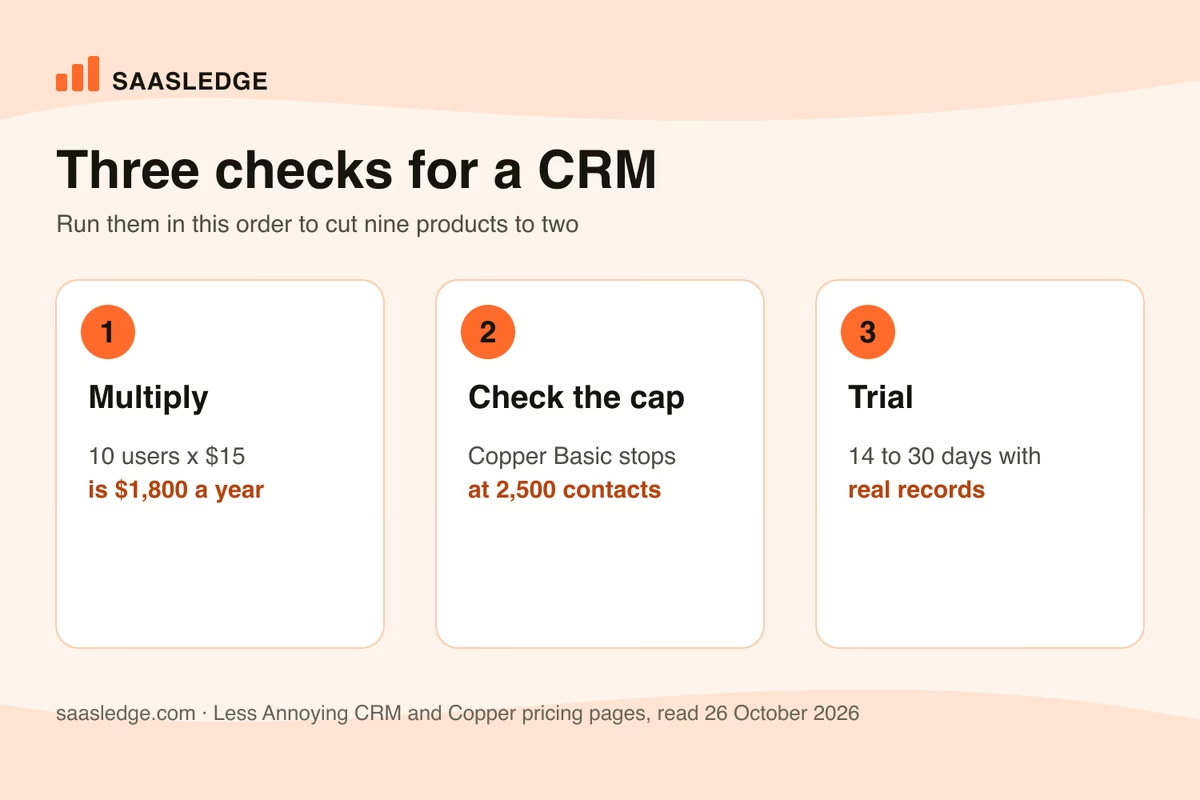
Check these in order. Multiply the seat price by the headcount you expect in 12 months. Compare your contact count with the plan’s cap. Then import real records and send real email from the tool for one week.
Two questions belong on any vendor call. The first is whether the price on the page is the price on the invoice. The second is what the next tier costs, because a team that likes the product will be on it within a year.
Last, read the export terms. A CRM that exports contacts but not activity history keeps the most valuable part of your data when you leave. For a wider shortlist, the browse view filters the catalogue by category, pricing model and free plan, and the CRM category lists more products than nine.
Products sold beyond the small-business segment, including industry CRMs, are listed in CRM software examples that actually ship.
Questions people ask about the best CRM for small business
What is the best CRM for small business?
The one whose price at next year’s headcount still fits and whose contact cap is above your list. For a flat bill, Less Annoying CRM at $15 per user. For a free start, Zoho CRM for 3 users or HubSpot. For a calling team, Close from $35. All prices were read on 26 October 2026.
What is the best free CRM for small business?
HubSpot, Zoho CRM and Capsule all have permanent free plans. Zoho allows 3 users, Capsule allows 2 users and 250 contacts, and HubSpot lists no credit card for its free plan. Pick the one whose first paid step you can afford, since free plans run out of seats before they run out of features.
How much does a CRM cost for a small business?
Entry and second-tier plans priced in dollars here run from $9 to $59 per user per month on annual billing, so 10 users cost between $1,080 and $7,080 a year. Less Annoying CRM at $15 is $1,800 for 10 users, and Close Essentials at $35 is $4,200. Add-ons and usage charges raise the invoice.
What is CRM software for small businesses?
It is a shared database of customers and prospects where every email, call and deal is attached to the right person or company. A small business uses it so that history does not live in one person’s inbox. The simplest version here is Less Annoying CRM, and the broadest free one is HubSpot.
What are the benefits of CRM software for a small business?
A second person can pick up a conversation and find the history. Every open deal has a next step and an owner, so deals stop disappearing in an inbox. Reporting shows where deals stall. These benefits only appear when the whole team enters data, so the cheapest tool people use beats a richer one they avoid.
Do I need a CRM with accounting for a small business?
Not usually. Few products do both well, and most small businesses connect a CRM to an accounting tool. If you hold stock or manufacture, look at ERP instead. The catalogue lists CRM, finance and ERP as separate categories for that reason, and each can be filtered by free plan.
Is a spreadsheet enough instead of a CRM?
For one person with a short list, yes. It fails at the first handover, because a sheet has no activity history, no owner for the next step and no record of who changed what. That is the moment most owners move to a free CRM tier.
Which CRM is best for a small sales team that calls customers?
Close, since calling, SMS and email sit inside the product. Essentials is $35 per user per month billed annually and workflows start at Growth at $99, read 26 October 2026. Outbound calls cost about $0.02 a minute on top, so the bill grows with call volume.
What is the cheapest paid CRM for small business?
Freshsales Growth at $9 per user per month billed annually is the lowest paid entry among the products priced in dollars here, and Close Solo is also $9 but limited to one user. Pipedrive, Zoho and Capsule start at €14 or £14 on their local-currency pages. Cheapest is not the same as cheapest at ten seats.
Can I switch CRMs later without losing data?
Yes, if the old tool exports contacts and activity history. Check that before signing, because some plans export contacts only. Plan a weekend for a small team with clean data: the import is quick, and the work is choosing which fields to keep and reconnecting integrations.
Read next
Best accounting software for startups in 2026
Best accounting software for startups in 2026: ten tools with prices read on 9 November 2026, free plans, what 3 users pay a year and who should skip each.

Best payroll software for small business in 2026
Best payroll software for small business in 2026: eight products, list prices read on 26 October 2026, costs for 5, 10 and 25 employees and free options.

CRM software examples that actually ship
CRM software examples that are sold today, grouped by what each product was built around, with dated prices, free tier limits, industry versions and a cost table for three team sizes.