Best payroll software for small business in 2026
Best payroll software for small business in 2026: eight products, list prices read on 26 October 2026, costs for 5, 10 and 25 employees and free options.

 Ruslan NazarovHead of SAASLEDGE
Jump to
- Best payroll software for small business in numbers
- The eight products side by side
- How the order was set
- The best payroll software for small business, one by one
- What payroll software costs for 5, 10 and 25 employees
- Free payroll software for small business: what free means
- What payroll software files for you and what stays yours
- Payroll with HR and accounting attached
- Payroll in more than one state
- Choosing by situation
- What to check during a trial
- Switching payroll mid-year
- Questions people ask about payroll software for small business
The best payroll software for small business is the one whose base fee plus per-person fee still fits at next year’s headcount, and that files your taxes without a second tool. Eight products are compared below, with prices read on the vendors’ own pages on 26 October 2026.
Six of them publish a number. Two of them, ADP RUN and Paycor, sell by quote, and the article says so instead of guessing.
Best payroll software for small business in numbers
Eight figures carry most of the decision. Each one names the vendor and the day it was read.
- $49 a month plus $6 per person is the Simple plan at Gusto, which runs payroll in one state, read 26 October 2026
- $55 a month is where OnPay says its pricing starts, which is its $49 base plus one worker at $6, read 26 October 2026
- $50 a month plus $8 per employee is the payroll-only plan at Justworks, against $79 and $124 per employee for its two PEO plans, read 26 October 2026
- $88 a month plus $6.50 per employee is the QuickBooks payroll bundle with Simple Start, shown at half price for three months, read 26 October 2026
- $109 a month for 10 employees is the list price on both Gusto Simple and OnPay, so the two cost the same at that size
- $15 a month plus $3 per person is what Gusto charges to move a Simple plan to next-day pay, read 26 October 2026
- 2%, 5%, 10% and 15% are the IRS failure-to-deposit tiers, from 1 to 5 days late up to a demand notice, read 26 October 2026
- 3 years is how long the US Department of Labor says an employer keeps payroll records, read 26 October 2026
At 10 people the cheapest list price is $109 a month and the dearest in the table is $1,240, a factor of more than 11, which is why a ranking that ignores headcount tells you little.
The eight products side by side
Order follows entry price for a company paying 10 people, lowest first, with the two quote-only products last. It is not a ranking, and nothing on SAASLEDGE is ranked for money.
| Product | Pricing shape | Entry list price | Built for |
|---|---|---|---|
| Gusto | Base fee plus per person, three tiers | $49 plus $6 per person | Owners who want payroll and benefits in one login |
| OnPay | One base plan, add-ons priced separately | $49 plus $6 per worker | Companies with workers in several states |
| Homebase | Free scheduling, payroll as an add-on | $49 plus $6 per employee | Hourly teams that already clock in there |
| Justworks | Payroll plan or PEO per employee | $50 plus $8 per employee | Teams that want an employer of record |
| QuickBooks Payroll | Bundles with accounting | $88 plus $6.50 per employee | Businesses that already live in QuickBooks |
| Rippling | Modules priced by quote | Custom quote | Teams that want HR, IT and payroll on one record |
| ADP RUN | Packages priced by quote | Quote form | Owners who want a large provider with phone support |
| Paycor | Bundles priced by quote | Quote form | Hourly and shift-based workforces |
Every price above is a list price read on 26 October 2026 and excludes tax. Quote-only means the vendor publishes no figure on its pricing page, not that the product is expensive.
How the order was set
Three rules decided who goes where.
First, a product with a public price outranks one with a quote form, because a buyer can check the number before talking to anyone. Second, a product that files payroll taxes inside the base price beats one that charges for each filing. Third, products with the same headline price are ordered by what the next tier costs, since most companies outgrow the entry tier.
Nobody paid for a place. SAASLEDGE has no paid placements, every outbound link carries rel="nofollow", and the catalogue rules are written out in a separate piece.
The best payroll software for small business, one by one
Each entry says who it suits, what it does better than the rest, and when to skip it. Prices were read on 26 October 2026 unless the text names a different day.
Gusto
Gusto suits owners who want payroll and benefits in a single account and who will pay a little more for a clean interface. Its Gusto pricing page lists three plans: Simple at $49 a month plus $6 per person, Plus at $80 plus $12, and Premium at $180 plus $22.
The Simple plan runs unlimited payrolls in one state and files taxes. Plus adds multi-state payroll and next-day pay, and Premium adds a named advisor and same-day and instant pay. Several things are sold separately: same-day pay is $90 per payroll on Simple, and instant pay is $100 per payroll.
Gusto cannot do payroll in many states at the entry price. Simple is one state only, and the state tax registration service for a new state is priced per state.
Skip it if you hire in more than one state and do not want to pay $12 per person from day one, or if you want a flat fee with no add-ons. A person who needs an employer of record should read the Justworks entry below.
OnPay
OnPay suits owners who want one plain price and no tiers to decode. The page lists a $49 base plus $6 per worker for Payroll Essentials, with W-2s, 1099s and every payroll tax filing included, and one month free.
Its edge is the many-states line: the page says the base plan pays workers in as many states as you need. Time tracking, HR and benefits are add-ons with their own base and per-worker fees, so a bundled setup climbs fast. Bundled HR is $71 a month plus $1 per worker, and bundled HR with time tracking is $81 plus $4.
The pricing page lists one per-worker rate and no separate contractor line, so a business with many contractors should ask before signing.
Skip it if you want a scheduling and time clock as the main product, because OnPay adds time tracking as a paid layer, and a tool built around shifts will feel more natural.
Homebase
Homebase suits hourly teams in shops and clinics that already use its time clock and schedule, the job of time tracking tools. Its free Basic plan covers one location and up to 10 employees, and payroll sits on top as an add-on at $49 a month plus $6 per employee, with the first six months free on the day it was read.
That promotional detail matters for the first-year bill. Six free months on a ten-person team removes $654 from year one, and the year-two price is the real one.
Homebase is built around hours worked, so it does not offer the benefits depth of Gusto. Salaried offices get less from it than from a payroll-first product.
Skip it if your staff are salaried and never clock in, since the main thing you would be paying for is the time and scheduling layer.
Justworks
Justworks suits teams that want someone else to be the employer of record, which pulls it toward HR and recruiting as much as payroll. It offers three shapes: a payroll plan at $8 per employee per month plus a $50 base fee, PEO Basic at $79 per employee with no base fee, and PEO Plus at $124 per employee.
The payroll plan is cheap for what it does. The PEO plans cost more per head because the vendor takes on employer duties and benefits administration. At 10 people PEO Basic is $790 a month, against $130 on the payroll plan.
Justworks is the answer for a company without any HR function. It is the wrong answer for a company that only wants a pay run and a tax filing.
Skip it if you only need payroll, because the PEO plans carry a price that buys co-employment you may not need.
QuickBooks Payroll
QuickBooks Payroll suits businesses whose books already sit in QuickBooks. The page read on 26 October 2026 shows bundles, not stand-alone plans: Workforce Payroll with Simple Start at $88 plus $6.50 per employee, with the first three months at half price, and an Essentials bundle at $125 plus $6.50.
Two limits show on the page. Next-day direct deposit is the standard speed on the entry bundle, and same-day deposit needs the Essentials bundle, which also needs a 7:00 am run time. A bundle also includes accounting, so you pay for a ledger whether or not you use it.
A company on another ledger gets less from this product than from a payroll-first one.
Skip it if your accounting lives elsewhere, since a payroll-only vendor will cost less and integrate with most ledgers anyway.
Rippling
Rippling suits companies that want payroll and HR on one employee record, with device management beside them. Its pricing page is a quote form, with no figure to read, and says the total depends on the products chosen and the headcount.
That makes Rippling impossible to price in a table like this one, so its entry stays blank. The product is built for growth, so it tends to make sense once a company has HR needs beyond paying people.
Skip it if you want to compare a number against the others today, or if you employ fewer than a handful of people with no need for HR or IT in the same system.
ADP RUN
ADP RUN is the large-provider option for small firms. ADP lists its small business payroll for 1 to 49 employees and four packages, Essential, Enhanced, Complete Payroll and HR+ and HR Pro Payroll and HR, all through a quote form, with no price on the page.
The page states that RUN deducts and files payroll taxes at every level. What you get beyond that depends on the package, and the quote is where it is set.
Skip it if you want to see a price before a sales call, or if you want to leave a contract with no friction.
Paycor
Paycor suits hourly and shift-based workforces, and its pitch is payroll plus time tracking and scheduling. Pricing is by quote: the page read on 26 October 2026 carries no dollar figure for the software, only a link to a plans page and a 50% offer for the first 6 months.
Like ADP, it is a provider to ask, not one to compare by a number on a page.
Skip it if your team is under five salaried people, since the product’s weight is in time and workforce management rather than a quick pay run.
What payroll software costs for 5, 10 and 25 employees
A per-person price means little until it is multiplied. The table below gives 12 months of list price for the products that publish both numbers, before tax and before any promotion or add-on.
| Product and plan | 5 employees | 10 employees | 25 employees |
|---|---|---|---|
| Gusto Simple, $49 + $6 | $948 | $1,308 | $2,388 |
| OnPay Payroll Essentials, $49 + $6 | $948 | $1,308 | $2,388 |
| Homebase payroll add-on, $49 + $6 | $948 | $1,308 | $2,388 |
| Justworks payroll plan, $50 + $8 | $1,080 | $1,560 | $3,000 |
| QuickBooks bundle with Simple Start, $88 + $6.50 | $1,446 | $1,836 | $3,006 |
| Gusto Plus, $80 + $12 | $1,680 | $2,400 | $4,560 |
| Gusto Premium, $180 + $22 | $3,480 | $4,800 | $8,760 |
| Justworks PEO Basic, $79 per employee | $4,740 | $9,480 | $23,700 |
All figures are the monthly list price multiplied by 12, read on 26 October 2026.
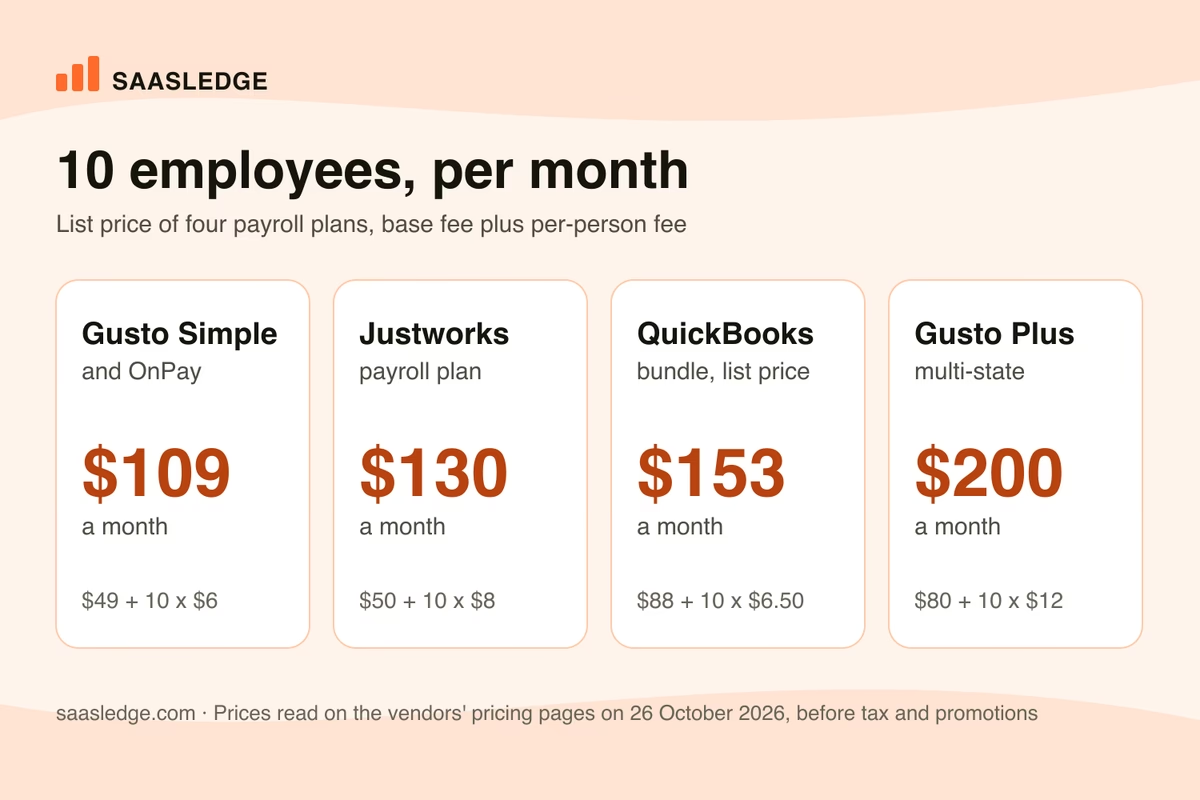
Three details are easy to miss. Gusto Simple and OnPay, with the Homebase add-on, price the same at every size, so for them the decision is about features, not money. The gap between the payroll-only line and the PEO line grows with every hire. Justworks’ own two plans are $3,660 a year apart at 5 people and $20,700 apart at 25.
And the QuickBooks line looks higher only because the bundle carries accounting. A company that already pays for QuickBooks should subtract that subscription before comparing.
Free payroll software for small business: what free means
Free payroll software for small business means one of three things, and none of them is full-service payroll with tax filing at no cost. It is a calculator, a free tier of a scheduling product, or a promotion that ends.
Of the eight products read for this article, none lists a free payroll plan with filings.
Homebase has a free Basic plan for 10 employees at one location, but that plan is time and scheduling, and payroll is the paid add-on, free for six months only as a promotion. Small business payroll software free of charge elsewhere in the market is usually a calculator that produces figures you then file yourself.
Open source payroll software for small business exists, and it shifts the filing and the year-end forms onto you. That is a bookkeeper’s project, not an owner’s.
Cheap payroll software for small business, then, is the $49 plus $6 shape. At 5 people it costs $79 a month, which is $15.80 per person, and the per-head price falls as the team grows.
What payroll software files for you and what stays yours
A full-service payroll product calculates pay, withholds tax and files the forms. It does not remove your liability: the IRS charges the employer for a late deposit, whoever clicked the button.

The IRS failure-to-deposit penalty has four tiers, read on the IRS page on 26 October 2026: 2% of the unpaid deposit for 1 to 5 calendar days late, 5% for 6 to 15 days, 10% beyond 15 days, and 15% after a demand notice. The tiers do not stack.
Quarterly Form 941 is due on the last day of the month after the quarter ends, and the IRS applies a weekend rule. The third-quarter 2026 return, due 31 October, falls on a Saturday, so the due date moves to Monday, 2 November 2026. Forms W-2 and 1099-NEC for 2026 are due on 31 January 2027, a Sunday, which moves them to Monday, 1 February 2027.
A deposit paid 16 days late costs 10% of the amount, and a deposit paid 5 days late costs 2%. The software only prevents it if the bank account and the schedule are right.
Record keeping stays with you as well. The Department of Labor’s FLSA recordkeeping sheet says an employer keeps payroll records for at least three years, and records behind wage calculations, such as time cards, for two. That is the reason the export format in the next sections matters.
Payroll with HR and accounting attached
Payroll rarely stays alone. The first additions are time tracking and HR documents, and the third is the ledger the payments post into.
HR and payroll software for small business is sold in two ways: as a bundle from one vendor, as OnPay does with HR at $71 a month plus $1 per worker, or as a payroll product that connects to a separate HR tool. Bundles are simpler to run and harder to leave. Separate tools keep the exit open and add a sync to maintain.
Small business software with payroll built in is a different product again.
Accounting suites such as QuickBooks sell payroll as a layer on the ledger, which removes a monthly reconciliation and ties you to one vendor. The pricing logic of that decision is worked through in software for small business, which prices the whole stack by team size.
For the pieces around payroll, the catalogue lists HR and recruiting, time tracking and finance and accounting tools, each with free plans marked.
A Mac is not a constraint. Gusto and OnPay run in a browser, so small business payroll software for Mac means the same products. Accounting suites that work on a Mac with payroll included follow the same rule: pick the web version.
Payroll in more than one state
Multi-state payroll is where entry plans end. A company that pays one remote employee across a state line has to register with that state for withholding and unemployment, and the payroll tool has to file there.
Gusto Simple covers one state, and Plus adds multi-state payroll. OnPay states that its base plan pays workers in as many states as you need. QuickBooks and Justworks treat it in their own terms, so ask for it in writing.
Registration is a separate cost. Gusto lists state tax registration at a price that varies by state, and its Business Compliance add-on is $85 a month per state on an annual contract. The software files after the registration exists, and getting registered is a task of its own.
Contractors are a different flow. Paying a 1099 worker needs no payroll tax filing, only a form at year end, and the tools differ in what they charge for it. Gusto lists $5 per payment to a US bank account for its global contractor service. Tools in the invoicing section cover the payment side without a payroll run.
Choosing by situation
Most buyers fit one of six situations, and each points to a first product to trial.
| Situation | Start with | Why |
|---|---|---|
| First hire, one state | Gusto Simple or OnPay | $49 plus $6, taxes filed, no tier to decode |
| Hourly staff on a time clock | Homebase | Payroll sits on the schedule they already use |
| Books already in QuickBooks | QuickBooks bundle | One ledger, payroll posts into it |
| No HR person, benefits needed | Justworks | The vendor is the employer of record |
| Workers in several states | OnPay or Gusto Plus | Multi-state payroll is on the plan |
| Growing, HR and IT on one record | Rippling or ADP | Quote-based, built for scale |
The table is a start for a trial, not a verdict, since five of the six rows end in a quote or a price that moves with headcount.
What to check during a trial
Run one real payroll, off cycle, in parallel with your current method. A trial that only imports sample data proves nothing about filings.
- Import the people and their year-to-date figures, then compare the totals to your last quarter’s return.
- Run a payroll with one overtime week and one deduction, and check the gross-to-net on a payslip against a hand calculation.
- Ask who files the state forms and who is liable when a filing is late.
- Find the export button. A product that exports payslips and year-to-date figures keeps your three years of records in your hands.
- Ask for the price at 25 employees in writing, with every add-on named, because a quote at 5 people says little about 25.
Two questions belong on any vendor call. The first is whether the price on the pricing page is the price on the invoice.
The second is what faster pay costs. Gusto lists $15 a month plus $3 per person for next-day pay on Simple, $90 per payroll for same-day and $100 per payroll for instant, which is a cost a monthly fee does not show. We wrote up the pattern behind such gaps with the questions that pull the missing numbers out.
Switching payroll mid-year
Switching is easiest on 1 January and hardest in the middle of a quarter. A mid-year move means loading year-to-date wages and withholding for every person, and an error there surfaces on the W-2.
Move at the start of a quarter if you can, since the new vendor then files a clean Form 941 from its first run. Ask the old vendor for year-to-date reports by employee and for the final tax filing confirmation. Run both systems on the same paydate once, compare the figures to the cent, and cancel the old one only after the new one has filed a full quarter.
To compare more products side by side, the payroll section of the catalogue lists what is available with free plans marked, and the browse view filters across categories.
Questions people ask about payroll software for small business
What is the best payroll software for small business?
The one that still fits at next year’s headcount and files taxes inside the base price. Gusto and OnPay both list $49 plus $6 per person, which is $109 a month at 10 employees. Justworks suits a company that wants an employer of record, and QuickBooks Payroll suits one already in QuickBooks. Prices were read on 26 October 2026.
How much does payroll software cost for a small business?
List prices in this comparison run from $79 a month for 5 employees on the $49 plus $6 plans to $395 a month for the same 5 on Justworks PEO Basic. Most small businesses pay a base fee plus a per-person fee, and add-ons such as same-day pay are charged separately, so the invoice can exceed the headline price.
Is there free payroll software for small business?
Not with tax filing included, among the eight products read here. Homebase has a free Basic plan for scheduling and time at one location with up to 10 employees, and its payroll add-on was free for six months on 26 October 2026 as a promotion. Free calculators exist, but then you file and deposit taxes yourself.
Is payroll software worth it for small businesses?
Yes, from the first employee, because the filing obligations are the same at 2 people as at 20. A paid product costs about $79 a month for 5 people, and a missed deposit costs 2% to 15% of the amount depending on how late it is. The software moves the work, not the liability.
What is the cheapest payroll software for a small business?
Among the products with a published price, the $49 base plus $6 per person on Gusto Simple, OnPay and the Homebase payroll add-on is the cheapest, at $79 a month for 5 people. Homebase was free for six months as a promotion on the day it was read. Cost rises with add-ons, and a quote-only vendor may undercut it.
Do I need payroll software with HR for a small business?
Only if someone is spending hours a month on onboarding paperwork. OnPay sells bundled HR at $71 a month plus $1 per worker, and Justworks bundles HR into its PEO plans. A company with three people and no turnover can run payroll alone and add HR later.
Can payroll software handle multi-state employees?
Yes, on the right plan. Gusto’s Simple plan is limited to one state and Plus adds multi-state payroll, while OnPay says its base plan pays workers in as many states as needed. State registration is a separate step that the software does not do for free, and Gusto prices it by state.
Does payroll software file taxes for me?
Full-service products calculate, deposit and file payroll taxes, and the pages for OnPay and QuickBooks say so. You remain liable for a late deposit. The IRS failure-to-deposit penalty runs from 2% for 1 to 5 days late to 15% after a demand notice, read 26 October 2026.
How long do I need to keep payroll records?
At least three years, according to the Department of Labor’s FLSA recordkeeping sheet, read 26 October 2026, and records behind wage calculations such as time cards for two years. Check what each product exports before you sign, because the records have to outlive your contract with the vendor.
What is the difference between payroll software and a PEO?
Payroll software calculates and files, and you stay the sole employer. A PEO such as Justworks PEO becomes a co-employer, running benefits for you, and costs more per head: $79 or $124 per employee a month against $8 plus a $50 base for the payroll-only plan, read 26 October 2026.
Read next
Best accounting software for startups in 2026
Best accounting software for startups in 2026: ten tools with prices read on 9 November 2026, free plans, what 3 users pay a year and who should skip each.

Best CRM for small business in 2026
Best CRM for small business in 2026: nine tools with prices read on 26 October 2026, free plans, costs for 3, 10 and 25 users and who should skip each.

CRM software examples that actually ship
CRM software examples that are sold today, grouped by what each product was built around, with dated prices, free tier limits, industry versions and a cost table for three team sizes.